

What you get
One build. The whole system.
Everything you just tapped through comes with the build — ordering, loyalty, push, tracking, the App Store listing, and the person who keeps it running. Watch each piece work below; nothing here is an add-on.
Your menu
Your menu, built in
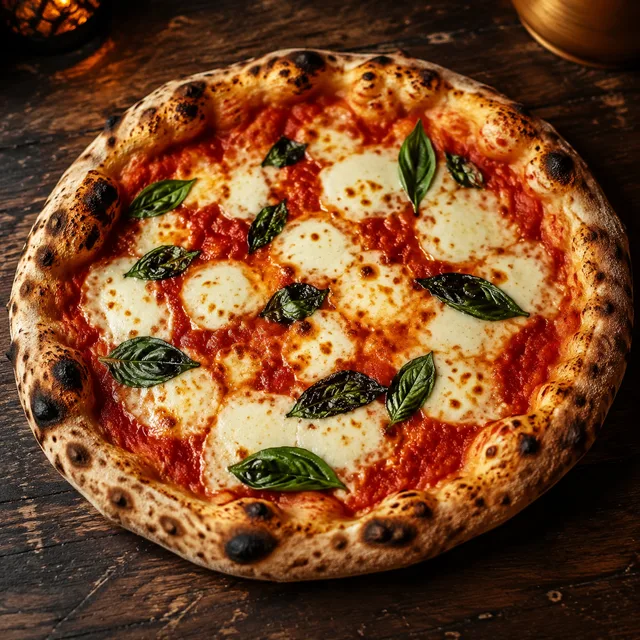
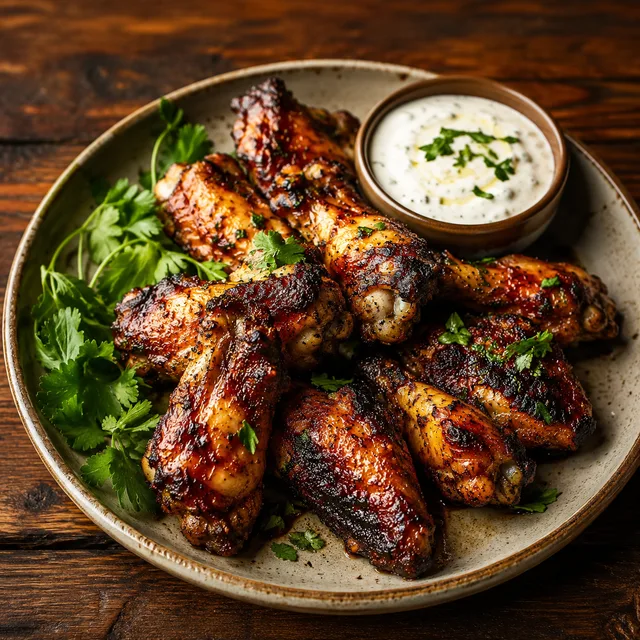
I take the menu you already have — a PDF, your website, a photo of the chalkboard — and build it in with photos, sizes, toppings, and prices. You proof every item before launch — and afterwards the menu is yours to edit in the dashboard, instantly.
Push
Push notifications
One tap puts your message on every customer's lock screen — no ad budget, no algorithm deciding who sees it. Prewritten templates mean a slow-night offer takes seconds, and sends are unlimited.
Loyalty
Loyalty that runs itself
Points on every dollar, punch cards, and a reward you choose — earned and tracked automatically at checkout. No stamps, no plastic cards, no extra work at the register.
Live orders
Live order tracking
Customers watch their order move from received to preparing to ready — so they show up when the food's hot instead of calling to ask. Fewer phone interruptions during the rush.
App store
A real app, in the App Store
A native iPhone app published under your restaurant's name, with your icon on their home screen — plus a web ordering page that works on any phone. I run the developer account, the listing, and the review — you just approve the result.
Support
I handle the tech
Hosting, updates, App Store rules, fixes — covered by the monthly, handled by the person who built it. You text me, it gets done, usually the same day. You run the restaurant.
01 — Ordering
Orders that run themselves.
Your regulars open the app, tap their usual or build something new — sizes, toppings, special instructions — and pay with Apple Pay in about twenty seconds. They pick a pickup time, watch the order move from received to preparing to ready, and walk in when it's hot. Your kitchen sees the order the moment it's placed, on whatever device is already sitting on the counter.
What I make
- A menu with photos, sizes, toppings, and special instructions
- Search, favorites, and one-tap reorder of their usual
- Apple Pay and card checkout with pickup time slots
- A live order timeline — received, preparing, ready
- Scheduled ordering for the lunch-rush crowd
What you get
- Commission-free ordering, forever — flat fee, no per-order cut
- Money straight to your bank through your own Stripe account
- Orders on your own devices — phone, tablet, back-office computer
- A web ordering page too, for customers without the app
Who it's for
Built for counters that are slammed at 12:15 — orders queue quietly on a screen instead of ringing the phone while you're plating.
For example
You just used it. The item you added in the demo went through the exact flow your customers would — same checkout, same tracking, your brand instead of a fictional one.
02 — Loyalty
Points that bring them back.
Every dollar spent in the app earns a point, automatically, with zero work at the register. At a threshold you choose — say 100 points — a reward you choose unlocks: a free slice, a free drink, whatever fits your margins. Punch cards, a welcome bonus, and give-$5-get-$5 referrals are built in too. It's the loyalty program the chains run, without the chain's back office.
What I make
- Points per dollar, earned automatically at checkout
- A reward you pick, unlocked at a threshold you set
- Punch cards — buy ten, get one free
- Welcome bonus for first-time signups
- Give-$5-get-$5 referrals that recruit their friends
What you get
- You choose the reward and can change it any time
- Your best customers, visible — names, visits, points
- The customer list is yours and exports any time
- No stamps, no plastic cards, no register workflow
Who it's for
For the restaurant whose regulars ARE the business — the goal is turning twice-a-month customers into weekly ones, and the free slice at 100 points does exactly that.
For example
In the demo, add items until the points cross 100 — the reward unlocks with a little celebration. That moment is engineered to be worth chasing.
03 — Push
Your regulars' lock screens, on demand.
A push notification goes to every phone with your app on it — free per send, unlimited sends, no algorithm deciding who deserves to see it. The owner side comes loaded with prewritten offers, so rescuing a dead Tuesday is three taps: open, pick a message, send. It's the only marketing channel where you own the audience outright.
What I make
- One-tap sends from the owner side of the app
- Prewritten offer templates you can adapt in seconds
- Sends land as real lock-screen notifications
- Tapping the notification opens your menu, ready to order
What you get
- Unlimited sends — included in the monthly, never metered
- Every download is a subscriber you keep
- No ad spend, no boosting, no gatekeeper
- The slow-night lever the marketplaces will never give you
Who it's for
For any owner who's stared at an empty dining room at 4 PM knowing their regulars would come if someone just reminded them.
For example
Toggle to the Owner side in the demo and send one — it lands on the customer screen exactly the way it lands on a real lock screen.
04 — the back office
Software runs the boring parts.
Your side is a real dashboard, not a settings page: a kitchen display where tickets land the second they're placed, a menu editor where 86ing a sold-out dish is one tap, and marketing you can write with AI in seconds. It runs on the devices you already own and comes with the monthly — the same software chains pay teams to operate, run by one owner between rushes. Want the phone to answer itself too? That's an optional add-on.
What I make
- Kitchen display + order board — Accept → Preparing → Ready
- Menu editor with one-tap 86, prices, photos, specials
- Push, SMS, and email campaigns — with 'Write with AI'
- AI review replies, morning briefings, demand forecasts
- Churn radar — regulars going quiet get flagged for win-backs
- An in-app AI concierge — 'something spicy for two' becomes a cart
- AI phone answering that takes spoken orders (optional add-on)
What you get
- The dashboard and its AI included in the monthly
- Runs on your own phone, tablet, or computer
- Your numbers, explained in plain English every morning
- Try it now — flip the demo to the Owner side
Who it's for
For the owner doing marketing at midnight and answering the phone mid-rush — the jobs nobody has time for get done anyway.
For example
Flip the toggle under the demo phone to 'Owner side' — the kitchen display, the 86 switches, Write-with-AI, and the AI call demo are all live in there.
On the big screen
The same dashboard, on your counter.
What you just used in the phone runs full-size on a laptop, an iPad at the register, or the computer in the back office — and this one works too. Accept the order, 86 a dish, write a campaign.
Phone, tablet, laptop — it's the same login. Orders can also auto-print to your receipt printer.
The AI
An AI staff that never calls in sick.
Every tile below is a real feature, playing itself. The marketing writes itself, reviews get answered, quiet regulars get won back, the busy Friday gets predicted — and if you want it, the phone answers itself too.
(561) 555-0164
Incoming call…
Friday, 6:42 PM — the counter is slammed.
The rush hits, the phone rings, nobody has to grab it — the AI answers, takes the order, and texts the checkout link. The call is logged in your dashboard.
One tap writes the push, text, or email. You just hit send.
Every review gets a thoughtful draft. You approve, it posts.
Yesterday: $912 · 31 orders · avg $29.40
Your numbers, explained in plain English, every morning at 7.
Regulars going quiet get spotted — and a reason to come home.
✨ Saturday looks +38% — prep extra dough Friday night.
It sees the busy Saturday coming — so you prep for it.
Snap the chalkboard — the AI builds the menu, prices and all.
Customers ask, it answers from your menu — and fills the cart.
Spicy Soppressata
Cup-and-char pepperoni, hot honey, provolone
The whole menu in your customers' language — automatically.
Tonight's special becomes tomorrow's post — drafted for you.
Also in the box
Everything on this wall is included in the monthly — except phone answering, the optional add-on.
From menu to app store
Five steps. One of them is yours.
The same fixed-price process as every Zylzio build — you see a working preview before you commit, and the number never moves without your sign-off.
01
Send me your menu
A PDF, your website, a photo of the chalkboard — whatever exists, plus your logo. That's your entire job in this step.
No forms, no spreadsheet homework. If the menu only lives behind the counter, I'll come in and take the pictures myself.
02
I build it — preview on your phone in days
Your brand, your colors, your items with photos, sizes, and options. It arrives as a working preview — the same kind you're tapping through on this page.
You go through it like a customer would and flag anything that's off. Nothing goes live until you've proofed every screen.
03
One number, in writing
A fixed build fee in writing, agreed before I start — then a flat monthly service from the day it launches. Never hourly, never a surprise.
Want something beyond the standard build? The price changes in writing before I build it — never on the invoice after.
04
Apple review
I handle the developer account, the App Store listing, the screenshots, and the review process. The app publishes under your restaurant's name, not mine.
Apple's review usually takes about a week and is the one part of the timeline nobody controls. I plan around it and keep you posted.
05
Launch with a kit
You get QR table cards, a counter sign, and a link for your socials and receipts — telling regulars becomes pointing at a sign. From launch, I monitor it and fix anything that breaks.
The flat monthly keeps it hosted, updated, and supported — with me a text away, not a ticket queue.
The money moment
A slow Tuesday, fixed.
You pressed this button in the demo. Here's the story it plays out in real life — the one feature that turns the app from a convenience into a lever.
4:15 PM
Tuesday's dead.
Three orders since lunch. Everyone who loves your food is at home, not thinking about you — and no amount of hoping changes that.
4:16 PM
One tap.
You pick a prewritten offer and hit send. It lands on 483 lock screens in seconds and costs you nothing — not per send, not per order it brings in.
By 6:00 PM
The kitchen's printing.
Regulars who'd forgotten about tonight suddenly remember. No ad budget, no algorithm, no commission on a single one of those tickets. That's the whole marketing department.
Regulars, not strangers.
The app is for people who already love your food — it turns their next order into one tap, and easier ordering means more ordering.
Keep the whole check.
Marketplaces take up to 30% and keep the customer. Your app is flat-fee: the order, the money, the name, and the history stay yours.
Look bigger than you are.
Chains have apps because apps work. Now the corner spot has one too — in the App Store, loyalty program and all.
The comparison
Four ways to take an order.
A website, a POS ordering module, the marketplaces, and your own app all have a job. Only one of them belongs to you.
Your own app
POS ordering
Toast, Square
Delivery apps
DoorDash, UberEats
Your website
✓Flat monthly — $0 per order
Software plans + their processing rates
✗Up to 30% commission
$0
✓Yours — your name in the App Store
✗Theirs — a shared marketplace app, or web-only
✗Theirs
No app
✓Yours — names, history, points
Lives inside their ecosystem
✗Theirs, by design
Nobody's — no accounts
✓Unlimited, included
✗Their app pushes their promos
✗They push their app, not yours
✗Not possible
✓Points, tiers, rewards — included
Paid add-on module
✗Their program, their data
✗None
✓One tap on their usual
Mostly at the register
✗Your listing, next to competitors
Re-Google the menu
Marketplace commissions run up to 30% per order on the top public tiers. Toast's consumer app is a shared marketplace (Toast Local) — your restaurant is a listing in it, not an app of its own; Square's branded ordering stops at the web. Verify current competitor pricing on their sites — structures change; the ownership question doesn't.
What's included
One build. One flat monthly. Everything in it.
No commissions, no per-order fees, ever. You get your exact number in writing on the call — and it doesn't move after that.
The build — one-time
- Your brand — name, icon, colors
- Full menu with photos, sizes, and options
- Loyalty, push, and the extras that fit your type — reservations, memberships, or catering
- A web ordering page for customers not on iPhone — works on any phone
- Published to the App Store under your restaurant's name
- Launch kit — QR table cards, counter sign, links
The monthly — flat, commission-free
- Hosting, updates, and App Store upkeep
- Unlimited push notifications
- Your dashboard — orders, menu editor, 86 button
- Multi-location ready — one login; extra locations quoted per store
- Direct support — you text me, I fix it
One number, in writing
The build fee is agreed in writing before any work starts — and it doesn't move after that. You see progress from week one.
Flat monthly from launch
Starts when the app is live in the App Store — hosting, monitoring, updates, and bug fixes, one flat number, zero commissions. Menu changes? You make those yourself, instantly.
Month-to-month
No contract, no lock-in. And the app is never abandoned — I monitor it, keep it updated, and fix anything that breaks.
Cancel the monthly any time — no contract. The app comes down (it runs on the hosting and App Store accounts the monthly pays for), and your menu, customer list, and data leave with you.
Fair questions
You're probably thinking…
Every owner asks some version of these — usually in this order. Straight answers, including the uncomfortable ones:
Grab a time
Bring your menu. Leave with a number.
Thirty minutes, straight answers, and a fixed quote in writing if it's a fit. Come with your menu and your questions — figuring out the rest is my job.

Sean Orgaz
30 Minute Meeting
30 min
Video call — details on confirmation
Tell me what you want to build, fix, or improve. Straight answers — no pitch.
Select a Date & Time
July 2026
Time zone
Eastern Time — US & Canada
Want this with your menu on it?
Email me your restaurant's name and a link to your menu. I'll put your brand in this exact demo — your name, your colors, your food — so you can see what your customers would get before you spend a dollar.
or email bate@zylzio.com